
BirdWeather PUC
Join a growing community of citizen scientists
European Customers:
 We're excited to share that Veldshop.nl are now the exclusive distributor for BirdWeather across Europe!
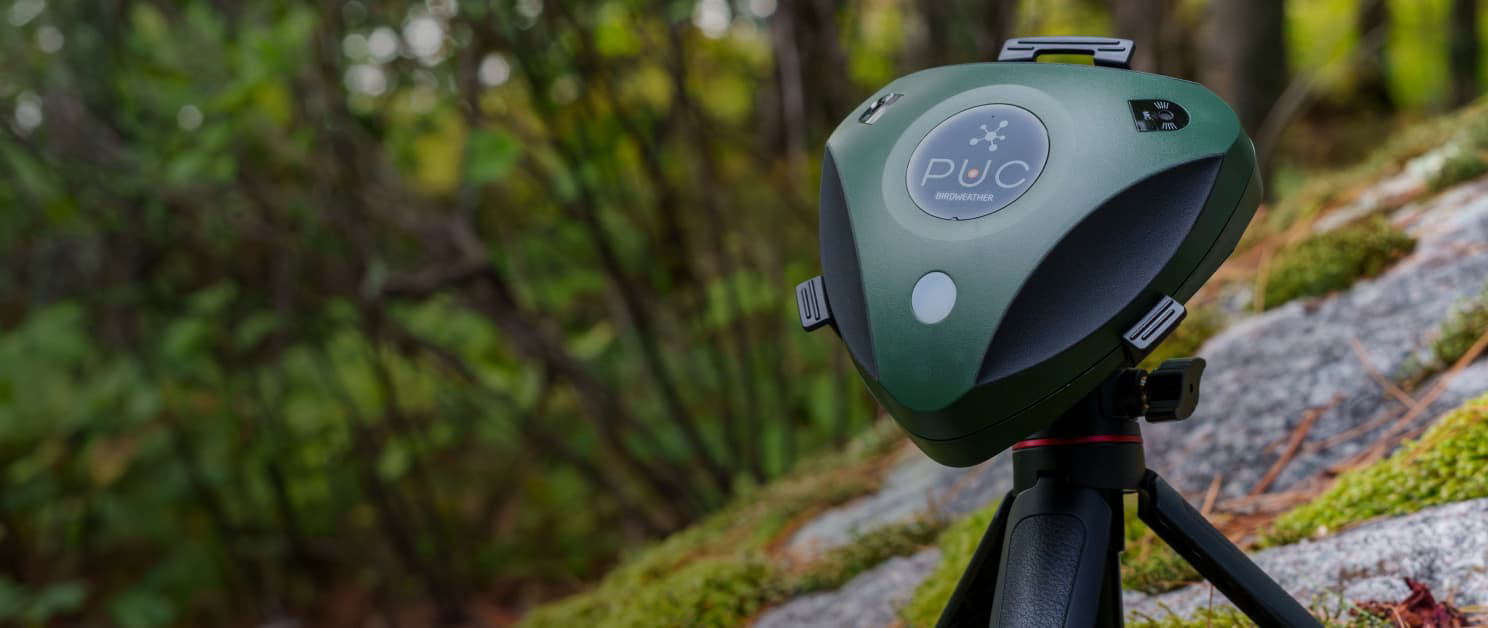

We’re excited to introduce PUC (Portable Universe Codec),
our AI powered bioacoustics platform.
Packed with dual microphones, WiFi/BLE, GPS, environmental sensors, and a built-in neural engine, all in a weatherproof enclosure, PUC is ready to capture all that nature can throw at it!

Backyard BirdWeather Station
Set up your PUC at home and it will continuously listen for any birds in your backyard soundscape, uploading all detections in real-time so you’ll know who’s singing, even if you’re not around.

Mobile Birding
Take your PUC with you on a hike or a ride (even stash it in a safe place for a few days) and once back home, it will automatically upload to BirdWeather where you can explore everything that it heard.

Research
Want to use PUC for your own research project? No problem! We’ll store all your data on the built-in microSD card in a simple CSV format for easy import into your project.
Simple
With a one button interface, just turn PUC on, and it will do the rest, automatically switching modes based on WiFi and location. If it's on, it's listening!
Automatic
Our cloud server will automatically process all of your PUC soundscapes. No sorting, no approving, it all happens 100% automatically!
Continuous
PUC is always listening.
No more near misses when you're out on a hike and the bird decides to go quiet just as you pull out your mobile phone, or that lone owl that you've been hearing out your window late at night.
Cloud Processing
Our cloud server uses the BirdNET neural network (a joint project between the K. Lisa Yang Center for Conservation Bioacoustics at the Cornell Lab of Ornithology and the Chemnitz University of Technology) to process all audio soundscapes from the PUC, featuring:
 Over 6000 global bird species!
- Man-made sources (e.g. fireworks, engine)
- Non-avian species (e.g. coyote, dog, fox, squirrel, frogs, insects)
- Automatic removal of any soundscapes with human vocal detections
Environment
In addition to its stereo microphones, PUC is also packed with environmental sensors, including (Temp, Humidity, Pressure, Air Quality, tVOC, CO2, and a Spectral Light Sensor) so you're able to track local weather conditions.

What's Included
PUC
Our flagship portable nature recorder, ready to capture the songs of birds you can see, and those you can’t.

Mobile App
With the full power of BirdNET in your pocket, the BirdWeather mobile app works hand-in-hand with your PUC.

Web Dashboard
Explore and listen to bird vocalizations from your own backyard as well as stations around the globe.

Specifications
Processing / Wireless
- ESP32-S3 MCU
(Integrated 2.4G WiFi / Bluetooth + AI Neural Engine)
Audio
- 2x MEMs microphones
Location/Time
- Low-Power GPS Module
- Ultra Precision Real Time Clock


Environmental Sensors
- AI-Powered Enviro Sensor
(Temp, Humidity, Pressure, VOC, AQI, CO2) - 11-Channel Spectral Light Sensor
- 3-Axis Accelerometer + Magnetometer
Power/Storage/Misc
- 3x AA Battery (Alkaline, Rechargeable, Lithium)
- uSD Card Slot / 32GB uSD Card (included)
- USB-C Data Connection (waterproof)
- 3x RGB LED (Controllable via App)
- Audible Buzzer (80dB - Controllable via App)
- Tripod Adapter (included)
BirdWeather
A living library of bird vocalizations
To live sustainably and have a healthy planet, we must understand how the systems which we depend on function.
Birds are a critical component of virtually every ecosystem on earth, and their fate is intertwined with ours.
Powered By BirdNET
BirdNET uses a neural network to identify birds by the sounds they make, and is a joint project between the K. Lisa Yang Center for Conservation Bioacoustics at the Cornell Lab of Ornithology and the Chemnitz University of Technology.
Why We Study Birds
Studying birds and bird populations is a way to further our understanding of the ecosystems that support all life on earth (including humans). Changes in bird populations and their behavior can tell us a great deal about the impacts of climate change, drought, weather, and habitat change.

A Global Community
Using the BirdNET artificial neural network, BirdWeather is continuously listening to a growing number of citizen science stations around the globe.

In Your Own Backyard
With your own BirdWeather station, you're not only contributing to the global community, you can identify and track the species in your own backyard!

Join the BirdWeather Community
Our open approach supports a growing list of ways to participate.
 BirdWeather PUC
 BirdWeather Mobile App
 BirdNET-PI
 YouTube Live Stream
 Locus Sonus Stream
Since going live on Nov 4, 2021 we've heard
... different species vocalize
... times across
... locations.

Recent Top Detections
(Click to play audio)
An Open Library for Research
From the beginning, we built BirdWeather to be an open system, with multiple ways for researchers to pull data from the library.


About the Team
Scribe Labs is a small team of technologists who spend our days building products that we love. We're excited to launch BirdWeather, our living library of bird vocalizations and the BirdWeather PUC, our portable bioacoustics platform.

Tim Clark
Founder & CEO

Vitalii Parashchak
Mobile Application Developer

Sam Pohlenz
Web Application Developer